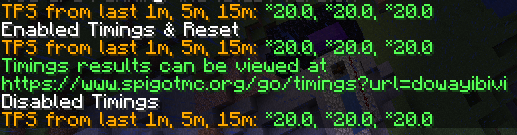
image-2018-08-08-21-20-55-753.png
[SPIGOT-4248] Ticks Per Second Command (/tps) Not Giving True Values Created: 09/Aug/18 Updated: 09/Aug/18 Resolved: 09/Aug/18 |
|
| Status: | Resolved |
| Project: | Spigot |
| Component/s: | None |
| Affects Version/s: | None |
| Fix Version/s: | None |
| Type: | Bug | Priority: | Minor |
| Reporter: | Simon Chuu | Assignee: | md_5 |
| Resolution: | Fixed | Votes: | 0 |
| Labels: | 1.13, tps | ||
| Environment: |
Spigot 1.13 with Windows 10, no plugins or a plugin. Latest spigot at the time of writing. |
||
| Attachments: |
image-2018-08-08-21-20-55-753.png
|
| Version: | CraftBukkit version git-Spigot-1503de9-4487c1f (MC: 1.13) |
| Guidelines Read: | Yes |
| Description |
|
In the versions of Spigot 1.13, the /tps command sometimes displays the wrong ticks per second value. This is often the case when there's at least one plugin on the server. Sometimes, this issue happens without any plugins. In the test, I used CoreProtect 1.15.1, but it can happens with any other plugins as well. Reproduction steps (no plugins): 1. Start the server. Reproduction steps (with plugins): 1. Download any plugins into the plugins folder. In my test, I used CoreProtect 1.15.1. Sometimes in both cases, the /tps command will say *20.0, *20.0, *20.0. The result may differ when you restart the server and test it again. This is normal right after server start, but all three should not be *20.0 after some time or when the server is lagging (down to 15, for example). I have a production server up where /tps is reporting all *20 while people are experiencing server lag and the timings say around 16 TPS. |
| Comments |
| Comment by Simon Chuu [ 09/Aug/18 ] |
|
There was one time when server reached 15 TPS based on Aikar's timing report, and it might happen again when server has many players online. I'm hoping to get accurate results thereafter. Thank you for checking it out and fixing it. I appreciate it |
| Comment by md_5 [ 09/Aug/18 ] |
|
TPS tracking has been fixed and tested. Given your server is running at close to 20tps you may not see a difference, but maybe you will (at least the * will probably be gone). |
| Comment by md_5 [ 09/Aug/18 ] |
|
Actually the TPS tracker is wrong, fancy that. |
| Comment by md_5 [ 09/Aug/18 ] |
|
Your timings report shows 19.81 tps average - i.e. no lag. Your server load is less than 75% indicating that also any lag spikes will be caught up and your TPS will not drop appreciably below 20. If neither average nor ewma show your “lag”, what measurement do you expect will? Should we be showing standard deviation of tick time or something? If your server lags for two ticks (say 300ms) and then runs the next 18 ticks within 700ms, tps will still be 20, regardless of whether it is an ewma, sma, or average. The tps command is meant to give a quick overview of your servers general performance. I will double verify that /tps is reflecting accurate information, but otherwise this isn’t a bug and I think you’re just misunderstanding what TPS is capable of representing. |
| Comment by Simon Chuu [ 09/Aug/18 ] |
|
I'll report back in an hour or so after restarting my production server with latest spigot. The production server runs on Ubuntu 18.04 on OVH and had the same (yet more extreme) issue. Edit: I have another server on the machine, and that one gives values between 19 and 20. This secondary server has less plugins (and does not run CoreProtect). Therefore and interestingly, this issue occurs when there's more plugins (or specific plugin with some event?) on the server. This seems to be unrelated to the OS as I got to test it on both Windows 10 and Ubuntu 18.04. The EWMA of TPS would be acceptable if the value reflects the real state of the server's TPS, but having it at *20 when players are experiencing eating lag (eating for longer than normal) or block-breaking lag (block reappearing before breaking again) is pretty questionable and unreliable. |
| Comment by md_5 [ 09/Aug/18 ] |
|
TPS command uses an exponentially weighted moving average Obviously all of these will produce different answers. But I doubt this is a bug. Reporting the "true" TPS would be useless as it would only show lag within the last second, which is useless. EWMA as currently used is imo the best because it gives a general overview whilst prioritising the last minute or so. Your timings paste also shows tps as effectively 20. 19.94 is within the margin of error on your OS scheduler. |